

EPICommunicator™
EPICommunicator™ (EPICom) is proprietary software for use with any Master-Touch™ flowmeter which has V3.9G or later software. It consists of four modules — EPITerm, EPIMeter, E-Logger™ and Modbus RTU — which work together to put complete control of the Master-Touch flowmeter in the hands of the user. EPICom uses the RS232, RS485 or USB communication protocol to connect a Master-Touch flowmeter to a PC running Windows XP® / Vista®.

EPICommunicator™ (EPICom) is proprietary software for use with any Master-Touch™ flowmeter which has V3.9G or later software. It consists of four modules — EPITerm, EPIMeter, E-Logger™ and Modbus RTU — which work together to put complete control of the Master-Touch flowmeter in the hands of the user. EPICom uses the RS232, RS485 or USB communication protocol to connect a Master-Touch flowmeter to a PC running Windows XP® / Vista®.
Please note that older versions of the Master-Touch software do NOT support all EPICom V2.0x functions. Secondary and Point-Wise Curve adjustments and E-Logger are only supported by Master-Touch V4.1 and higher software. For all Master-Touch flowmeters produced prior to Feb 2010, please contact the factory for the appropriate version.
EPITerm™
EPITerm is a Windows XP® / Vista® compatible terminal emulation program which uses the RS232 or USB communications protocols to present the Master-Touch system for real-time monitoring and control. The system features eight operational modes and their corresponding menus:
- The 500 *Run* Menu displays the real-time flow rate and total flow as well as information about the relay alarms status, time-stamping of high and low flows, etc. This is the basic operating mode for flow measurement.
- The 100 *Meter* Menu provides easy access to change the engineering units for the flow rate and total, to adjust the Full Scale setting for scaling the output signals, and to reset the total and timestamps.
- The 200 *Utility* Menu supports such functions as changing the signal filtering (to smooth out pulsation or unwanted flow noise), monitoring the digital and analog voltage signals, and selecting the meter calibration range.
- The 400 *Alarm* Menu is utilized to set the two flow alarm relays to respond to a wide variety of process conditions and situations.
- The 450 *E-Log* Menu supports real-time data logging (flowmeters running Master-Touch v4.1 software only).
- The 700 *S-Curve Fit* Menu supports adjustments to the factory calibration with a set of coefficients derived from field testing (flowmeters running Master-Touch v4.1 software only).
- The 750 *PW-Curve Fit* Menu is used to apply specific adjustments to the factory calibration in increments of 5% of the Full Scale (flowmeters running Master-Touch v4.1 software only).
- The 800 *P-Curve* Menu is reserved for factory calibration configuration and variables, although some menu items, such as the C-Factor, SetXSect, and Auto Zero, may be used for field adjustments.
EPIMeter™
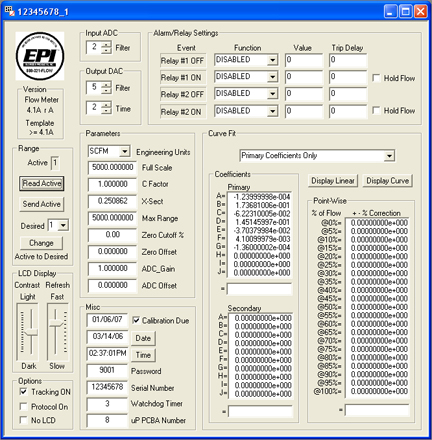
EPIMeter allows access to all of a flowmeter’s settings through one PC screen. The functions and parameters of these settings are fully described in the EPITerm section. EPIMeter is NOT a direct, real-time connection to the flowmeter’s operation. It is used to upload/download .mtr files for modifications to a flowmeter’s settings, access archived *.mtr files and to print copies of *.mtr settings files. EPIMeter
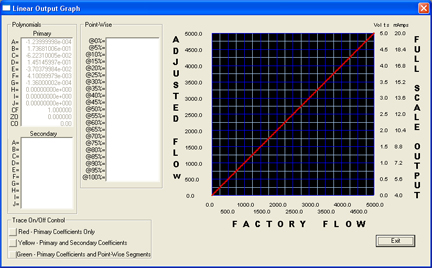
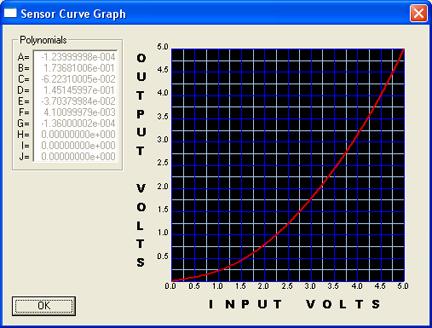
EPIMeter will also generate graphs showing the non-linear curve output of the sensor and the linear 0–5VDC output for each flowmeter. These graphs (shown below) are useful in understanding the affects of changes to the Full Scale, Zero Offset, C Factor, etc.
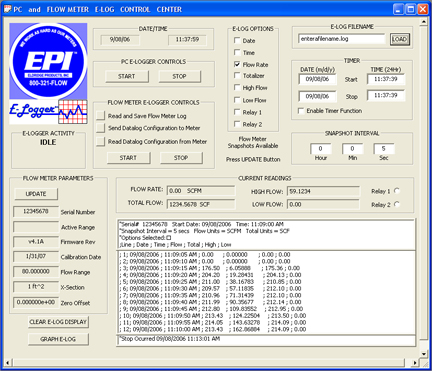
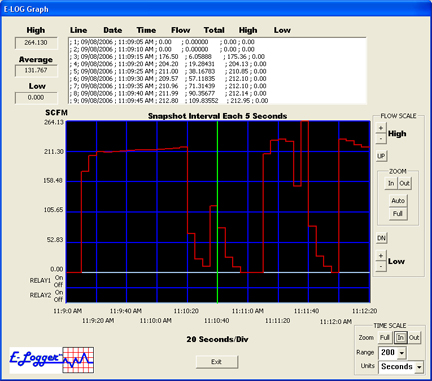
E-Logger includes a fully functional, PC-based data logger that works in conjunction with Master-Touch™ flowmeters which have v4.1A and higher software. The user can select from a set of categories for the data collection, the time interval for each data “snapshot” and, if necessary, programmed start and stop times. The data is stored on either the flowmeter or a PC. E-Logger will also graph the data, and it provides tools for analysis of the data. Data files stored on a PC can be accessed by most common spreadsheet applications.
The EPICom . zip file above includes a sample data file (samplefile.log) which can be used to see how our data logging module, E-Logger, is used. First extract the software to a folder on your PC. Then when running E-Logger, simply type “samplefile.log” in E-LOG FILENAME window and click the LOAD button. This will populate E-Logger with data that can then be viewed and graphed by the module.
Modbus RTU
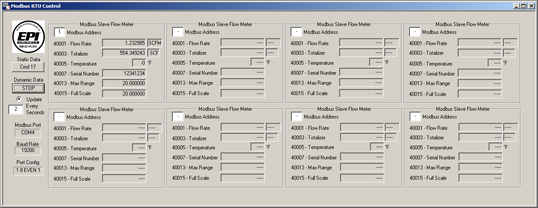
Master-Touch flowmeters support RS485 Modbus RTU communications. EPICommunicator v2.15b displays data from as many as eight flowmeters, or you can use third-party software for Modbus data acquistion to incorporate the flowmeters into a facility-wide system.
-

Flow Switches
EPIEldridge Products, Inc. (EPI) Series 7000, 7100, and 7200 Flow Switches are rugged flow switches for gases. Our flow switches are built with the same components as our flowmeters and operate on the same prinicpals of thermal dispersion. They include two High/Low relays for High/High, Low/Low, and Low/High switch options. One second to thirty seconds time delay is a available as a standard, with automatic reset in one second upon resumption of non-fault flow conditions. Two LEDs provide verification that an alarm has been triggered. The flow switches are calibrated for your process conditions and the relay trip points can be easily set up in the field. Factory calibrated trip points are also available, at an additional charge. -
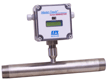
Master-Touch™ MPNH Series
EPIEPI’s Master-Touch™ flowmeters incorporate the following subsystems to perform signal processing functions: sensor, bridge controller, microcomputer, and I/O communication outputs. Our proprietary microcomputer performs digital signal processing (DSP) functions utilizing a high speed, high resolution 16-bit analog to digital converter (ADC), a central processing unit (CPU) and a high resolution 14-bit digital to analog converter (DAC). Our CPU is an embedded microprocessor including random access memory (RAM), read-only memory (ROM), a serial communications controller (SCC), and I/O data lines. -

Versa-Cap Integral 450 or Remote 460
Level Switches, Capacitance Probes, Capacitance Probes, Devalan, L&J Technologies
Versa-Cap Integral 450 or Remote 460
Level Switches, Capacitance Probes, Capacitance Probes, Devalan, L&J TechnologiesVersatile R.F. Capacitance Level Transmitter for liquids, slurries and bulk solid applications. -

Flow Averaging Tubes (FAT™)
EPIMP Series FAT™ flowmeters are approved for use in hazardous locations. Series 9100MP-9200MP instruments have an explosion-proof flow transmitter mounted at the point of measurement with the signal processor electronics remotely mounted in a separate, general purpose enclosure. An explosion-proof enclosure for the remote electronics is available as an option. The Series 9700MP-9800MP instruments have all electronics mounted at the point of measurement in an explosion-proof enclosure.